Many of us Houzzers are struggling to find the right paint colours for our homes. We spot a beautiful wall colour, and we just want THAT shade. Hopefully we've eliminated that dilemma for you now with the launch of our Colour Picker Tool.
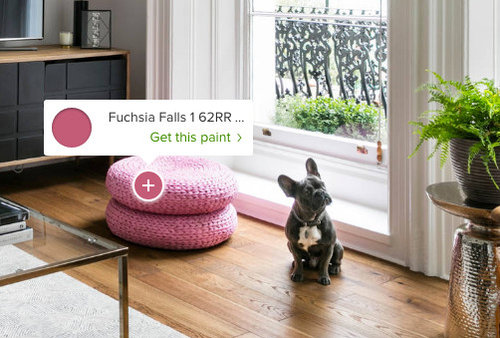
Our new Colour Picker Tool will identify matching paint colours from any item seen in any image on Houzz! Whether it's the paint itself, the fabric of the sofa or the artwork on the wall, when you activate the colour picker tool hot spots will identify a matching Dulux Amazing Space colour and enable you to click straight through to order a sample.
How the Colour Picker Tool works
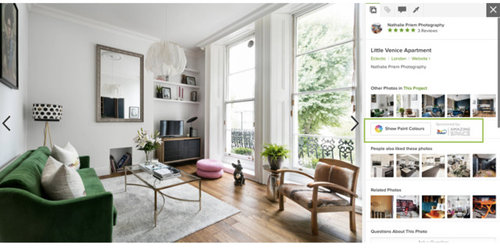
When you open any image on Houzz the Colour Picker Tool will appear along the right hand side.
Click on the 'Show Paint Colours' button and it will activate the Colour Picker Tool.
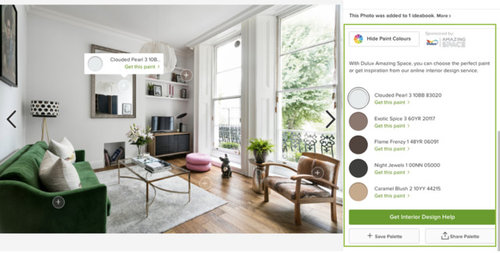
5 hot spots will appear on the photo you are looking at. These hot spots can all be dragged around the photo and whatever they land on, they will identify a matching paint colour for you.
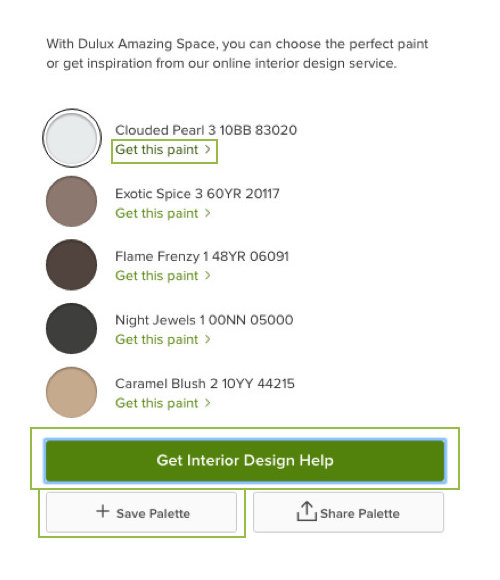
Your colour palette will then appear along the right hand side where you can either:
- Click on an individual colour to go through to Dulux Amazing Space to request a sample or purchase the paint
- Save the paint palette to your ideabook as a reference during your home improvement project.
We hope that you enjoy using the tool and if you have any feedback please feel free to share your comments with us here!





Comments (21)
minnie101
Sonia
Related Discussions
Parquet Flooring
Q
Live Chat with Dulux Amazing Space: How to find your style
Q
Accent colour and soft furnishings for grey victorian lounge
Q
Living and dining room decor help + Home Bar idea
Q
stefanmh
Emmeline WestinOriginal Author
sqezefrau
stefanmh
stefanmh
stefanmh
stefanmh
OnePlan
OnePlan
OnePlan
OnePlan
garycostello
sqezefrau