

Designing Flexible Media Rooms for Movies, Games, and Everyday Living
Homeowners increasingly want multi-functional spaces where technology meets comfort. Flexible media rooms support seamless transitions between streaming, gaming, and day-to-day use. Creating a space that adapts ensures lasting enjoyment and efficient use of every square foot.
Integrating flexible design into your media room allows one area to serve as a central hub for both entertainment and relaxation, including casual digital games on platforms like american luck. This approach helps meet the demand for living spaces that host movie nights, video game sessions, and casual gatherings without major layout changes. Selecting features and furnishings that serve multiple functions allows you to make the best use of compact spaces. For example, intentional design can transform media rooms to suit your lifestyle needs.
Understanding trends and defining your space’s purpose
Modern households often require spaces that handle a combination of streaming services, console or PC gaming, and informal hangouts for friends or family. Media rooms are popular because they offer versatile solutions, allowing you to switch easily between activities and making every square foot count, whether in a new build or a remodel.
Begin by establishing the primary use for your media room, whether it is a cinema, a dedicated gaming zone, or a family lounge. Once you determine this core use, consider how you can plan for overlapping needs like homework, guest accommodation, or a hobby corner. Prioritizing sightlines to the main screen and considering traffic flow ensures the room feels cohesive, even as usage shifts throughout the week.
Creative layouts and furniture for adaptability
Successful flexible media rooms often feature seating zones, such as arranging a main viewing area in front of the display with a separate nook for conversation or board games. Modular sofas, ottomans that double as tables, and lightweight chairs can be moved or reconfigured, allowing the room to meet your needs on short notice.
Clearances matter. Ensure enough space for recliners to extend or for sectionals to be rearranged. In some rooms, especially those intended for mixed use, flexible furniture can maintain openness and flow, keeping the environment comfortable and welcoming for all activities.
Optimizing screens, lighting, and minimizing distractions
Your choice between a large TV or a projector depends on viewing habits, desired screen size, and available throw distance. Consider mounting your screen at a height that ensures good visibility from all seating areas and use cable management systems for a tidy appearance.
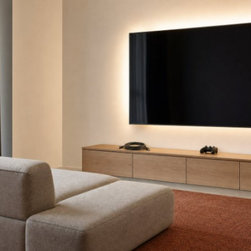
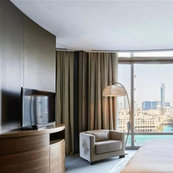
Lighting influences both comfort and screen clarity. Layer your lighting with recessed ambient options, task lamps, and accent fixtures, all controlled with dimmers. Add bias lighting behind screens to reduce eye strain and select window treatments that limit glare during daytime viewing. Soft surfaces like rugs and upholstered chairs help control noise, while thoughtful speaker placement delivers immersive sound without disturbing adjoining rooms.
Storage solutions and cohesive finishing touches
A media room that looks inviting and clutter-free benefits from built-in cabinets or furniture with closed storage. Stow controllers, remotes, and media out of sight, and choose options with ventilation to keep consoles or receivers cool.
Finally, focus on finishes. Select durable fabrics and easy-clean materials that stand up to daily life, and coordinate colors with the broader home palette. Rather than leaning into themed décor, a balanced design encourages relaxation and supports flexible, ongoing enjoyment.
Integrating flexible design into your media room allows one area to serve as a central hub for both entertainment and relaxation, including casual digital games on platforms like american luck. This approach helps meet the demand for living spaces that host movie nights, video game sessions, and casual gatherings without major layout changes. Selecting features and furnishings that serve multiple functions allows you to make the best use of compact spaces. For example, intentional design can transform media rooms to suit your lifestyle needs.
Understanding trends and defining your space’s purpose
Modern households often require spaces that handle a combination of streaming services, console or PC gaming, and informal hangouts for friends or family. Media rooms are popular because they offer versatile solutions, allowing you to switch easily between activities and making every square foot count, whether in a new build or a remodel.
Begin by establishing the primary use for your media room, whether it is a cinema, a dedicated gaming zone, or a family lounge. Once you determine this core use, consider how you can plan for overlapping needs like homework, guest accommodation, or a hobby corner. Prioritizing sightlines to the main screen and considering traffic flow ensures the room feels cohesive, even as usage shifts throughout the week.
Creative layouts and furniture for adaptability
Successful flexible media rooms often feature seating zones, such as arranging a main viewing area in front of the display with a separate nook for conversation or board games. Modular sofas, ottomans that double as tables, and lightweight chairs can be moved or reconfigured, allowing the room to meet your needs on short notice.
Clearances matter. Ensure enough space for recliners to extend or for sectionals to be rearranged. In some rooms, especially those intended for mixed use, flexible furniture can maintain openness and flow, keeping the environment comfortable and welcoming for all activities.
Optimizing screens, lighting, and minimizing distractions
Your choice between a large TV or a projector depends on viewing habits, desired screen size, and available throw distance. Consider mounting your screen at a height that ensures good visibility from all seating areas and use cable management systems for a tidy appearance.
Lighting influences both comfort and screen clarity. Layer your lighting with recessed ambient options, task lamps, and accent fixtures, all controlled with dimmers. Add bias lighting behind screens to reduce eye strain and select window treatments that limit glare during daytime viewing. Soft surfaces like rugs and upholstered chairs help control noise, while thoughtful speaker placement delivers immersive sound without disturbing adjoining rooms.
Storage solutions and cohesive finishing touches
A media room that looks inviting and clutter-free benefits from built-in cabinets or furniture with closed storage. Stow controllers, remotes, and media out of sight, and choose options with ventilation to keep consoles or receivers cool.
Finally, focus on finishes. Select durable fabrics and easy-clean materials that stand up to daily life, and coordinate colors with the broader home palette. Rather than leaning into themed décor, a balanced design encourages relaxation and supports flexible, ongoing enjoyment.